Virtual Yoga Classes: How to Create the Best At-Home Yoga Experience Anywhere in the World
The popularity of virtual yoga classes has grown rapidly across the world. From busy professionals to travelers and home-based practitioners, more people are choosing to practice yoga inside a well-designed virtual yoga studio rather than commuting to physical locations.
However, joining a virtual class is only the first step. To truly benefit, your space, camera, lighting, and audio setup must support clear communication between you and your instructor.
This guide will help you create the perfect at-home virtual yoga studio so your instructor can see you clearly, guide you safely, and deliver a high-quality yoga experience—no matter where you are in the world.
Why Virtual Yoga Classes Are Popular Worldwide
Virtual yoga classes offer flexibility, accessibility, and consistency. Students can now practice with skilled instructors without geographical limits.
Key benefits of virtual yoga classes include:
- Practice yoga from anywhere in the world
- Flexible schedules with live and recorded sessions
- Personal attention in small groups or one-on-one formats
- No travel time or location dependency
With the right setup, a virtual yoga studio can feel just as effective as an in-person class.
Camera Positioning for Virtual Yoga Classes
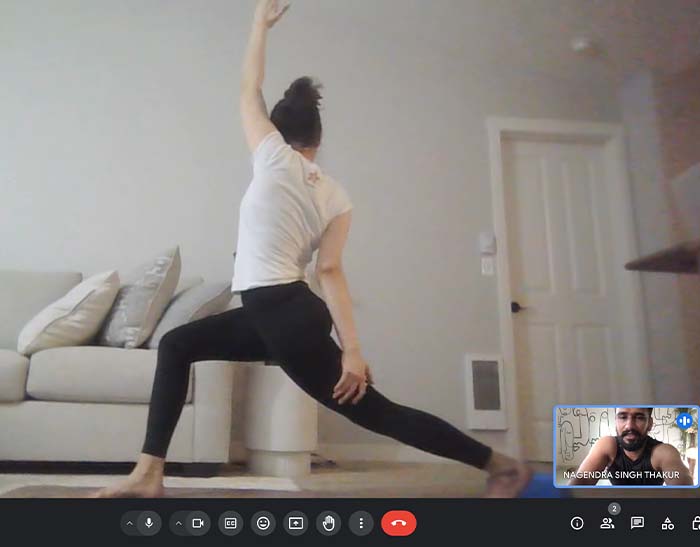
Camera placement is one of the most important elements of a successful virtual yoga class. Proper positioning allows the instructor to see alignment, posture, and transitions clearly.
Best Camera Positioning Tips
- Place the camera far enough to capture your body from head to toe
- Keep the camera at waist or chest height
- Ensure the camera is straight, not angled upward or downward
- Test your setup before class using your phone or laptop camera
Correct camera placement allows your instructor to give accurate posture corrections inside the virtual yoga studio.
Choose a Quiet Space and Ensure Stable Internet
Both audio quality and internet stability are essential for smooth virtual yoga classes.
Ensure a Stable Internet Connection
A poor connection can interrupt the flow of your practice.
- Use a wired internet connection if possible
- If using Wi-Fi, stay close to the router
- Avoid streaming or downloads during class
- Aim for at least 10 Mbps upload and download speed
Stable connectivity ensures uninterrupted guidance during your virtual yoga class.
Reduce Echo and Background Noise
Clear sound helps you follow breathing cues, instructions, and relaxation guidance.
- Choose a closed room instead of a large open space
- Use curtains, rugs, or yoga mats to absorb sound
- Turn off fans, televisions, and background devices
- Avoid rooms with high ceilings and empty walls
A quiet environment significantly improves the virtual yoga experience.
Lighting Setup for Virtual Yoga Classes
Good lighting ensures the instructor can clearly observe movements and alignment.
Best Lighting Tips
- Face a natural light source such as a window
- Avoid standing with bright light behind you
- Use a ring light or soft artificial light if needed
- Ensure your face and body are evenly lit
Proper lighting enhances visibility and safety inside your virtual yoga studio.
Wear the Right Colors for Better Visibility
Clothing and background colors can affect how well your instructor sees your movements.
Color Selection Tips
- Wear solid, contrasting colors
- Avoid clothes that blend with wall or floor colors
- Choose calm shades like blue, green, or neutral tones
- Avoid busy prints or patterns
Good color contrast helps instructors track alignment clearly during virtual yoga classes.
Essential Props for Your Virtual Yoga Studio
You don’t need expensive equipment, but basic props make your practice safer and more effective.
Basic Prop Checklist
- A non-slip yoga mat
- Yoga blocks (or sturdy books as alternatives)
- A yoga strap or belt
- A blanket or towel for relaxation
Having props ready allows your virtual yoga instructor to suggest modifications confidently.
Optional: Two-Camera Setup for Advanced Practice
For personal training or therapeutic sessions, a two-camera setup can enhance instructor feedback.
- One camera facing the front
- One camera placed on the side
- Helps instructors observe spinal alignment and posture depth
This setup creates a professional virtual yoga studio experience for advanced practitioners.
Importance of Clear Voice and Audio Quality
Audio clarity is as important as video quality in virtual yoga classes.
- Use earphones or a wireless headset if available
- Keep microphone volume balanced
- Instructor instructions should be calm, clear, and consistent
Clear audio helps students stay focused and relaxed throughout the class.
Final Thoughts: Create Your Ideal Virtual Yoga Studio at Home
When you focus on camera positioning, internet stability, clear audio, proper lighting, suitable clothing, and basic props, your virtual yoga classes become highly effective and enjoyable.
With a well-prepared setup, your virtual yoga studio connects you to expert guidance, personal attention, and a global yoga community—wherever you are.